



WhatsApp is widely used for messaging, but you may not always remember which phone number is linked to your account. Fortunately, you can quickly check your WhatsApp number on both Android and iPhone.
Here’s how to find it.
Find Your WhatsApp Number on Android and iPhone
Open the WhatsApp app on your iPhone or Android device, then go to the Settings page.
On an iPhone, tap Settings in the bottom-right corner of the app.
On Android, tap the three-dot menu in the top-right corner, then select Settings.
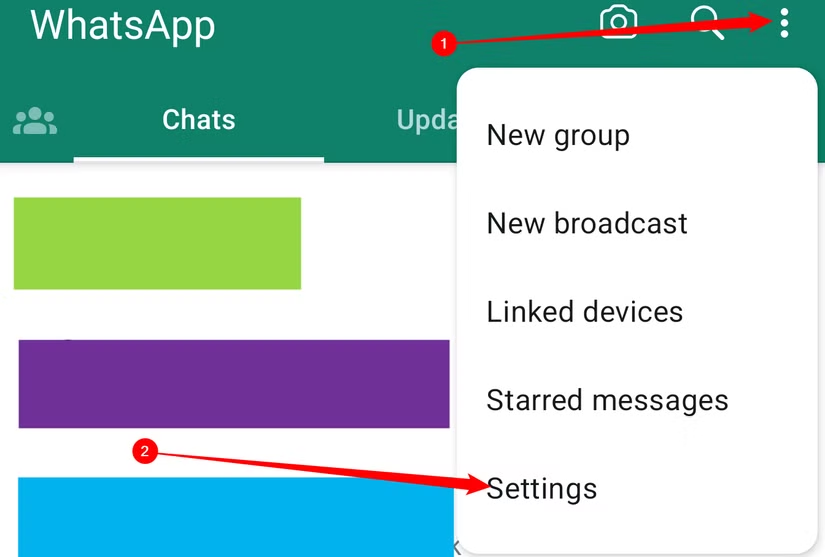
On the “Settings” page, at the top, tap your name. This will open your profile page.

On the Profile page, look for the Phone section. Here, you’ll see the phone number currently linked to your WhatsApp account.
This is the number WhatsApp uses to identify your account.

If you’d like to change the phone number that WhatsApp uses, tap your number and follow the on-screen instructions.

That’s all it takes to check which phone number is linked to your WhatsApp account. Once you find it in your profile settings, you can easily confirm the number you’re using for WhatsApp on your smartphone.
Now you’re ready to keep chatting with confidence.
Frequently Asked Questions:
How can I check my WhatsApp number?
Open WhatsApp, go to Settings, tap your profile, and look for the Phone section. Your linked WhatsApp number will appear there.
Can I check my WhatsApp number on both Android and iPhone?
Yes. The process is very similar on both Android and iPhone, although the location of the Settings option is slightly different.
Where is the WhatsApp phone number shown on iPhone?
Open WhatsApp, tap Settings at the bottom of the screen, select your profile, and check the phone number listed there.
Where can I find my WhatsApp number on Android?
Open WhatsApp, tap the three-dot menu in the top-right corner, choose Settings, and then tap your profile to view your number.
Is my WhatsApp number the same as my SIM card number?
Usually, WhatsApp is linked to the phone number you used when setting up the account. However, it may be different from the number currently active on your SIM card.
Can I change the phone number linked to my WhatsApp account?
Yes. WhatsApp includes a Change Number feature that lets you move your account information to a new phone number.
Can I use WhatsApp if I forget my phone number?
Yes. If you are already signed in, you can check the number linked to your account from the WhatsApp profile settings.
Conclusion:
Checking your WhatsApp number is quick and easy on both Android and iPhone. You can find the phone number linked to your account by opening WhatsApp, going to Settings, and viewing your profile information.
Knowing where to find your number can be helpful when setting up WhatsApp on a new device, confirming account details, or sharing your contact information with others.
